What Is a Riser Desk? Everything You Need to Know
Ever looked up after hours at your screen and thought, why does my neck feel like a wooden plank?
We’ve all been there. And the fix might be a lot closer than you think.
A riser desk is a small addition that can shift how your whole workday feels. No new furniture. No drilling. No big budget needed.
In this guide, I’ll walk you through what a riser desk is, how it works, who it’s for, and what it can do for your body and focus. You’ll also get buying tips, setup advice, and myth-busting facts that most people miss.
Let’s get into it.
The Problem: You’ve Been Sitting Wrong This Whole Time
Most of us sit at a desk for hours, doing homework, working, gaming, and never think twice about it. You sit down, hunch forward, and before you know it, three hours have passed.
Your back is done with you. Our bodies were built to move. But modern life glues us to chairs for 8 to 10 hours straight.
That’s where things start to break down. Here’s what too much sitting does to your body:
- Tight shoulders and a stiff neck
- Low energy throughout the day
- That heavy, foggy feeling every afternoon
- Rounded posture that gets worse over time
Your chair isn’t the problem here. But sitting too long, without breaks, is a real problem. That’s exactly what a riser desk helps fix.
What Even Is a Riser Desk?
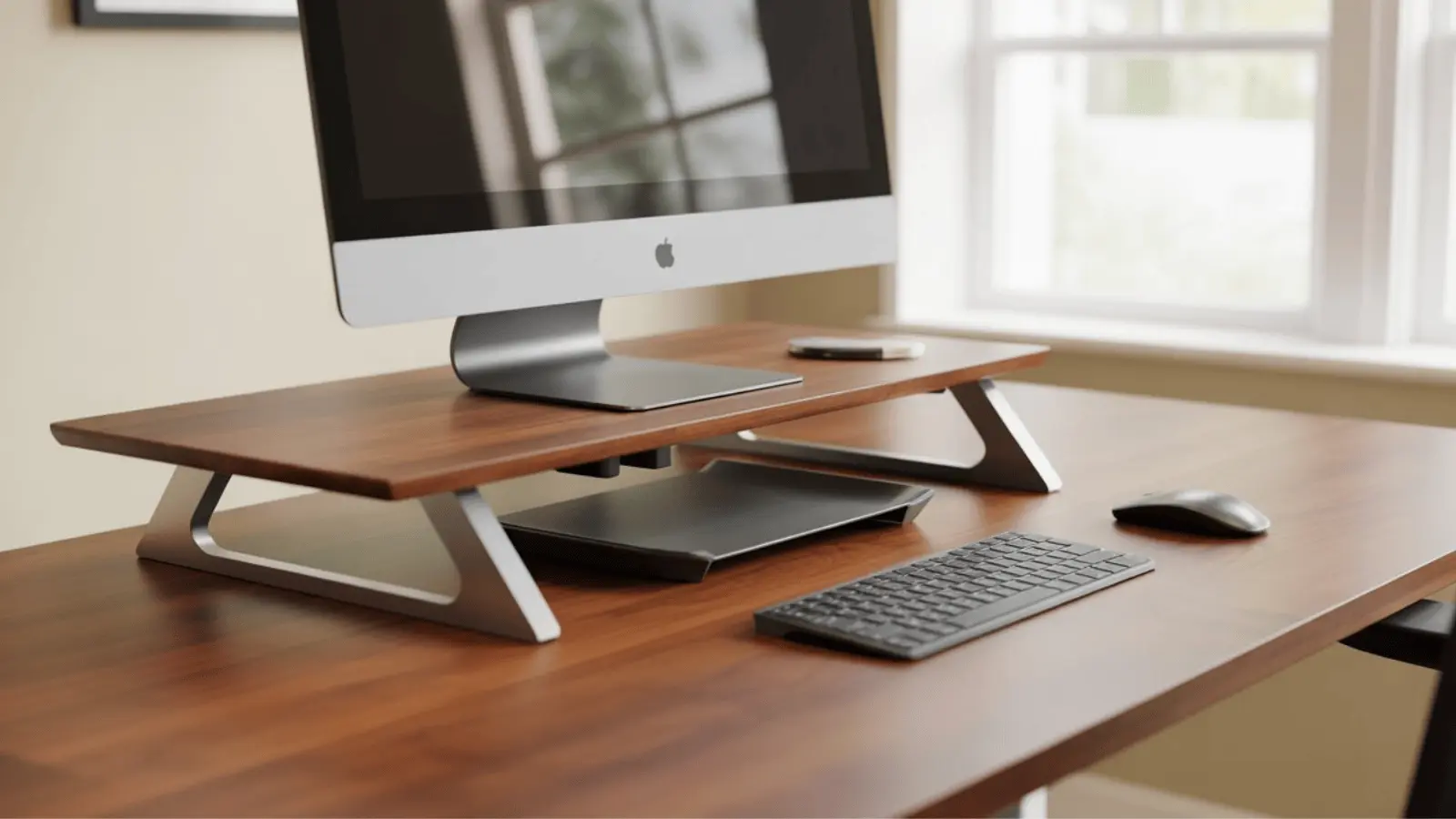
A riser desk is a platform that sits on top of your existing desk and moves up and down. When you want to stand, you raise it. When you want to sit, you lower it.
Think of it like an elevator for your keyboard and screen. You don’t need a new desk. You don’t need to install anything. You place it on your current desk, and you’re ready to go.
Riser Desk vs. Standing Desk
This is the most common mix-up. Here’s how they differ:
Standing Desk: A standing desk replaces your whole desk. It’s a full piece of furniture with legs that move up and down on their own.
Riser Desk: A riser desk sits on top of your current desk. It’s an add-on, not a replacement.
A standing desk is the whole pizza. A riser desk is the upgrade that makes your current setup way better.
Which One Should You Get? If you have a desk you like and want the option to stand sometimes, go with a riser desk. It’s more affordable, takes up no extra space, and gets the job done. If you’re building a new workspace from scratch, a standing desk might make more sense.
Monitor Riser vs. Desk Riser Converter
These two get mixed up a lot. Here’s the difference:
- Monitor Riser: Lifts your screen to eye level. That’s all it does. No sit-stand function. Helpful for posture, but you can’t stand and work with it.
- Desk Riser Converter: Lifts your full workspace: monitor, keyboard, and mouse, all at once. This is the one that lets you switch between sitting and standing whenever you want.
How Does a Riser Desk Actually Work?
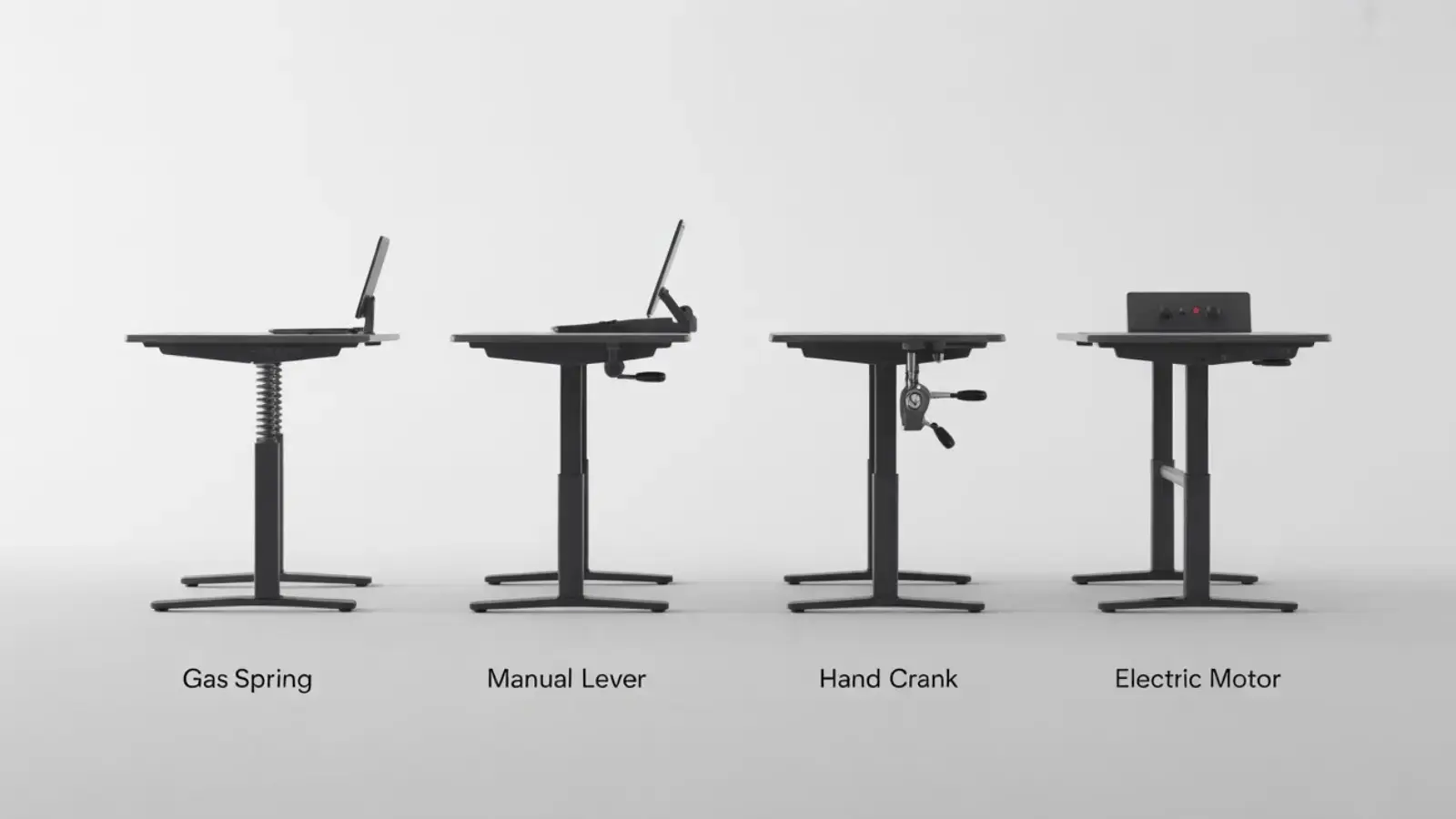
There are four main ways a riser desk moves up and down. Each one works a bit differently. Here’s a quick breakdown.
Gas Spring: The Smooth One
Uses air pressure to move up and down. You lift the handle, and it glides up effortlessly. No cranking. No buttons. This is the most popular type, and for good reason.
Manual Lever: The Classic
You pull a lever, adjust the height, and lock it in place. Reliable, affordable, and straightforward. Takes a little more effort, but works well for most people.
Hand Crank: The Slow and Steady
You turn a handle to raise or lower it: like winding something up. It works, but it takes more time. Not the best choice if you switch positions often throughout the day.
Electric / Motorized: Press a Button
Press a button, and it moves on its own. Smooth and effortless. Some models let you save your preferred heights, so it stops exactly where you need it. The most convenient option, and the priciest.
Single Tier vs. Double Tier
You’ll also need to choose between two layout styles:
- Single Tier: One flat surface for everything, monitor, keyboard, and mouse all move together. Clean and minimal.
- Double Tier: Two levels, your monitor on top, your keyboard on a lower shelf. This mimics a more natural typing position and is easier on your wrists. A lot of people prefer this once they try it.
Who Is a Riser Desk Actually For?
More people than you’d expect. A riser desk isn’t only for office workers in fancy buildings. Below are the individuals who can benefit from one:
1. People Who Work From Home
Working from home sounds freeing until your kitchen table becomes your office and your back gives out by noon. A riser desk drops right onto whatever table you’re using and makes your setup far more comfortable.
2. Students Doing Homework or Online Classes
Long study sessions take a real toll. Sitting in one position for hours while doing assignments drains your focus and energy. A riser desk gives students the option to switch positions and stay sharper throughout the day.
3. Office Workers Who Can’t Replace Their Desks
Not every workplace lets you swap out the furniture. A riser desk sits on top of your existing office desk, no permission needed, no hassle.
4. Small Spaces and Apartments
Full standing desks can be bulky and expensive. If you’re in a small room, a dorm, or a tight apartment, a riser desk gives you the same benefits without eating up your whole space.
5. Renters
Renters can’t drill holes or make big changes. A riser desk needs zero installation. You place it down and start using it. That’s it.
Benefits of a Riser desk
A riser desk isn’t a magic cure. But when used correctly, it can significantly impact how you feel daily. Here’s what the research shows:
- Less Neck and Shoulder Pain: Screen at the right height to reduce hunching and daily discomfort.
- Better Posture Without Trying: Standing naturally straightens your spine without any conscious effort required.
- More Energy Through the Day: Light movement while standing helps steady energy levels and reduces afternoon sluggishness.
- Better Focus: A body that feels better supports sharper thinking and stronger productivity throughout the day.
How to Pick the Right Riser Desk?
You don’t need to spend hours comparing specs. Follow these five steps, and you’ll find the right one without any stress.
Step 1: Measure Your Desk First
Before anything else, grab a measuring tape. Check the width and depth of your current desk. Your riser needs to fit on top of it. This sounds obvious, but many people skip this step and end up returning their purchase.
Step 2: Know What You’re Placing on It
What you’re putting on the riser changes what size and weight capacity you need.
- Just a laptop: Keep it compact and lightweight. A basic riser works well and won’t cost much.
- Multiple monitors: You need more width and a higher weight capacity. A wobbly surface won’t cut it with two screens.
Step 3: Pick Your Adjustment Style
Your budget and how often you switch positions will guide this decision.
- Electric: Easiest to use, but costs more. One button press and you’re done.
- Gas Spring: The sweet spot for most people. Smooth, reliable, and reasonably priced.
- Manual Lever: Works well for people who don’t switch positions often.
Step 4: Check These Three Numbers
These matter more than anything else on the product page.
- Height Range: Your monitor should sit at eye level when you’re standing. Check that the riser goes high enough for your height.
- Weight Capacity: Add up everything you’re placing on it. Make sure the riser can handle all of it comfortably.
- Surface Size: Make sure there’s enough room for your monitor, keyboard, and mouse without feeling cramped.
How to Set Up a Riser Desk the Right Way?
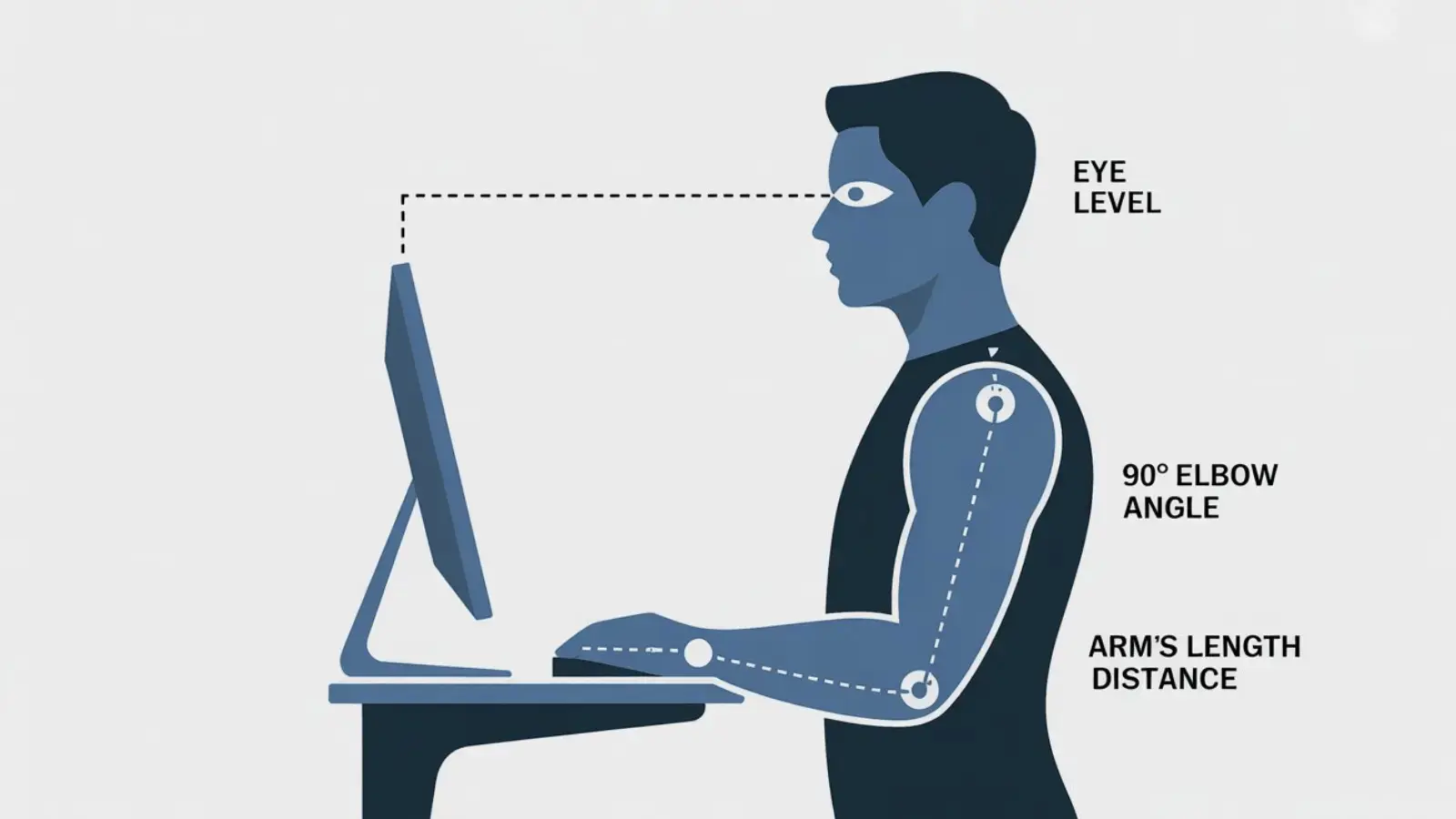
If you’re looking down, the screen is too low. If you’re looking up, it’s too high. Adjust until it feels natural with no effort.
Where Should Your Keyboard and Mouse Be?
Your elbows should bend at roughly 90 degrees when your hands rest on the keyboard. That’s the right position.
If your shoulders are raised or your wrists are bent at a weird angle, something needs adjusting. Keep your mouse right next to your keyboard at the same level. Reaching too far for the mouse every few minutes adds up and strains your shoulder.
How Far From the Screen?
About an arm’s length away. Stretch your arm out straight. Your fingertips should just about touch the screen.
Any closer and your eyes work overtime. Any further and you’ll start squinting and leaning forward.
Conclusion
A riser desk is one of those small changes that makes a bigger difference than you’d expect.
No more stiff neck by lunchtime. No more sluggish, foggy feeling dragging you down every afternoon.
This guide covered what a riser desk is, how it works, who it’s for, and how to pick and set up the right one. Now it’s your turn.
Measure your desk, set your budget, and take the next step. Your back will thank you. Drop your thoughts and ideas in the comments!
Frequently Asked Questions
How Long Do Riser Desks Last?
A decent quality riser desk can last five to ten years with regular use. Gas spring models hold up well as long as you don’t push them past their weight limit.
Electric models depend on the motor quality. Look for at least a one-year warranty before buying.
Can Kids or Teenagers Use a Riser Desk?
Yes, and more families should think about this. Long study sessions and online classes have kids sitting for hours. A riser desk works well for younger users. Make sure the height range adjusts enough to fit their size.
Will a Riser Desk Scratch My Existing Desk?
Most riser desks come with rubber feet or padding on the base to protect your surface. If you want extra protection, place a thin mat underneath. As long as you’re not dragging it around, your desk surface should stay scratch-free.